Property Management Ads: Ideas That Fill Units, What Each Costs With AI, and the Fair Housing Rule on Pictures
The ads that fill vacant units and win new owners, how to make each one in Novoads from your own unit photos, what they cost, and HUD's rule on ad pictures.

Mauricio Valdivia
·11 min
The make-ready's done and the unit still sits empty
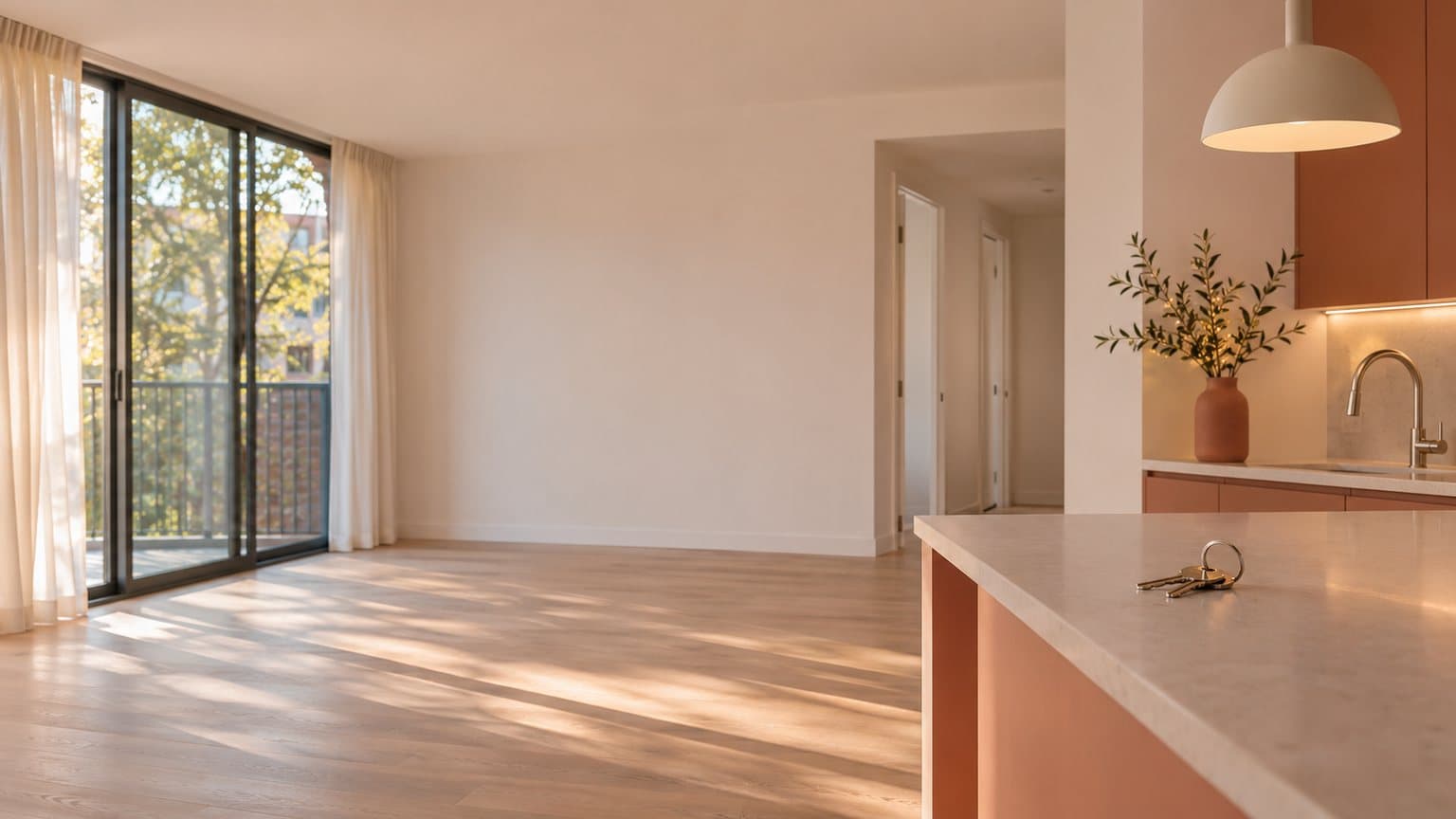
The paint's dry, the keys are back in the lockbox, and nobody's booked a showing yet for the unit you turned last week. You've got a camera roll of vacancy photos and an owner asking when the rent starts coming in again. The top guides we opened for this search hand you ideas (better photos, video tours, move-in specials), then stop short of showing you how to make the ad and what it costs.
We've already made one clip like this. On November 9, for our real estate ads guide, we generated a still of an invented living room in Novoads and asked for a slow walk from the doorway toward the window. The camera moved as asked, but the model also added houses outside the window and more kitchen than the still had. That kind of addition is the first thing to catch before a clip of a real unit goes out.
For this post, we read the top Google results for property management ads (we opened four), HUD's ad rule in the Code of Federal Regulations, the Fair Housing Act's exemptions in the U.S. Code, HUD's Federal Register notice withdrawing some of its guidance, and our own price tables. The room and its clip come from that November 9 test. We made nothing new for this post, and we didn't run any ads.
Five ads that fill units and win new doors
Between them, the four guides we opened cover photos and video tours of vacant units, promotions, marketing aimed at property owners, reviews and the neighborhood around a building. Each of those topics makes a different ad, with its own job and its own list of things AI shouldn't fake.
The vacancy walkthrough
A short clip of the empty unit, room by room, is the ad a renter watches before deciding whether a showing is worth the drive. AI does this well when each clip starts on your own photo of the room and only moves the camera, because then the clip opens on the floors, counters and light the renter will see in person. The walkthrough must never show a room, finish, view, amenity or staging the unit doesn't have, or pass off an AI-made interior as the real one.
The move-in special
A special gives a renter a reason to sign this month, whether it's a reduced first month, a waived application fee or a flexible move-in date. An AI presenter reading the offer to camera is quick to make, and just as quick to remake when the special changes. The presenter speaks for your company and is never shown as your leasing agent, your staff or a current tenant. Nothing in who it is, how it looks or what it says should hint at who the unit is or isn't for. Our guide to AI actors explains what they are.
The pitch to landlords
The other half of the business is adding doors, and this ad is for owners. An AI presenter can read the services you actually offer and the fee you actually charge, over your photos of homes you already manage. The ad shouldn't show an AI actor playing a landlord client who praises you, a result you can't document (days to lease or an occupancy rate) or a home you don't manage.
The review ad
This one puts a real tenant's or owner's review on screen, in their own words and with the star rating they gave, over your photos. We'd ask the reviewer first and keep their words exactly as written. The ad never has an AI actor read the review as if it were the reviewer, and it never shows a review nobody gave.
The neighborhood ad
Some units rent on the block more than on the floor plan. This ad shows the building and the real places near it (the park, the transit stop, the café on the corner), all from your own photos. It doesn't show places, views or amenities that aren't nearby, and it doesn't fill the street with made-up residents or a cast that hints at who should live there.
Turning a vacancy's photos into ads in Novoads
Each of these ads starts from photos you took at the make-ready, plus a script for the parts someone reads aloud. Shoot each room in daylight from the doorway, with the lights on and the blinds open, because whatever the photo leaves out, the model has to make up.
A walkthrough clip that opens on your photo
- Open Video. The editor opens on Omni Flash, one of the models that can start a clip on your photo.
- Switch from Reference to Start / End Frames and add your living room photo as the start frame. The editor tells you "The video starts on this picture."
- In the prompt, describe only the camera move, such as a slow walk from the doorway toward the window, and ask for the room to stay exactly as it is, with no people and no text.
- Pick 8 seconds, keep 720p, and press the round arrow button to send it.
What comes back is an 8-second clip that begins on your photo. Run the kitchen the same way and you've got the pair our cost table prices.
Kling 3.0, Kling 4.0 and Google Veo 3.1 also start on a photo, which you drop in the box that reads "Drop a start frame or click to upload". Wan 3.0 uses the same Start / End Frames switch as Omni Flash. Seedance takes a photo only as a reference named @Image1 in the prompt, so its clip won't open on your unit. Starting a clip on your photo is the same idea as turning a product photo into a video.
Our made-up room and what the model added
We don't have a real unit to show you, so this is the pair we made on November 9 for our real estate ads guide. We made the still with Nano Banana Pro at 2K for 2 credits, and here it stands in for the photo you'd take of a vacant room. Then, through our Claude connector, we had Omni Flash turn it into a 6-second clip at 720p that opens on the still. That clip cost 18 credits, so the pair came to 20.
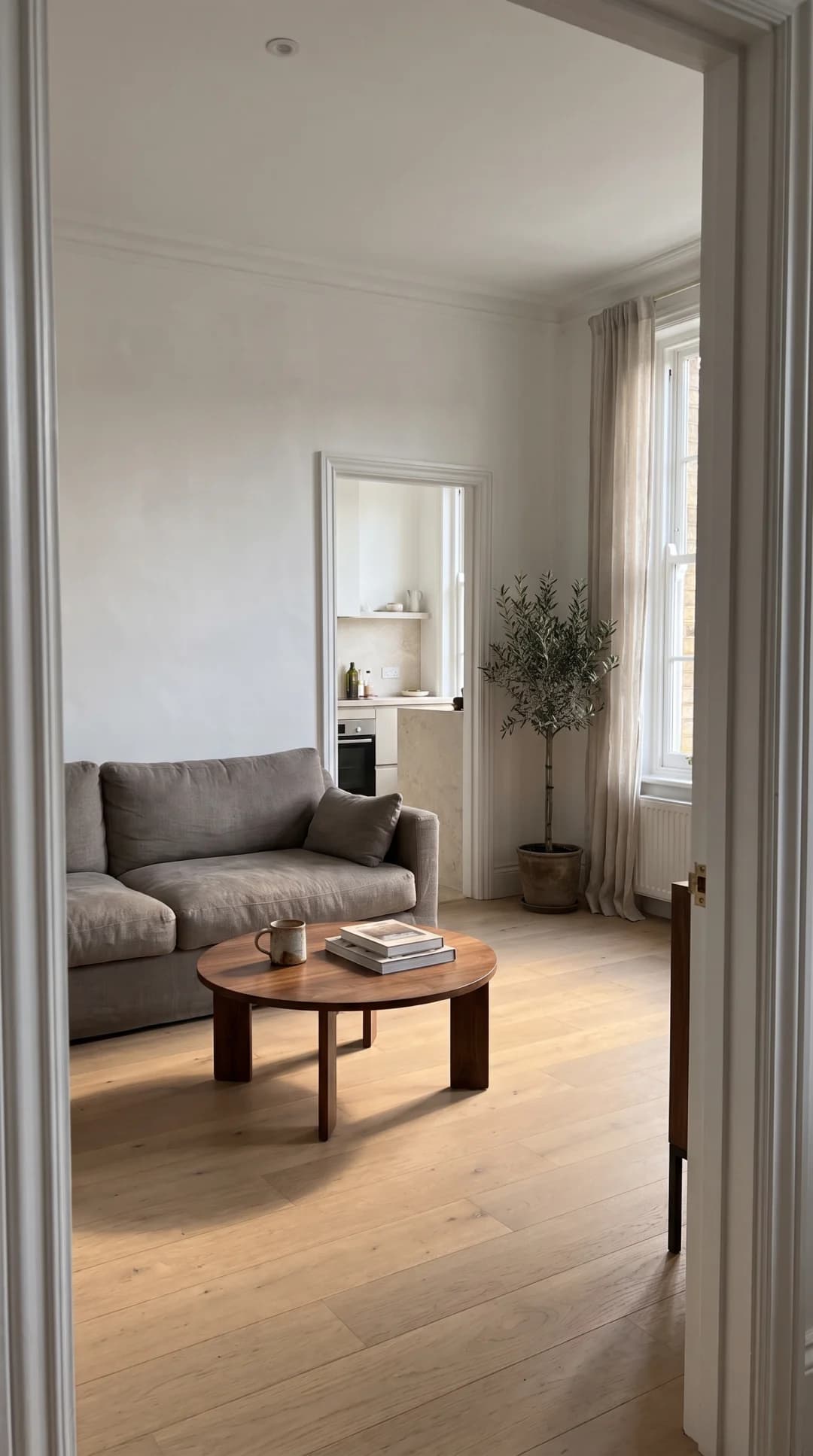 Made in Novoads with Nano Banana Pro · the invented room from our real estate ads guide, standing in for your own photo of a vacant unit, 2K, 9:16, 2 credits · 2026-11-09
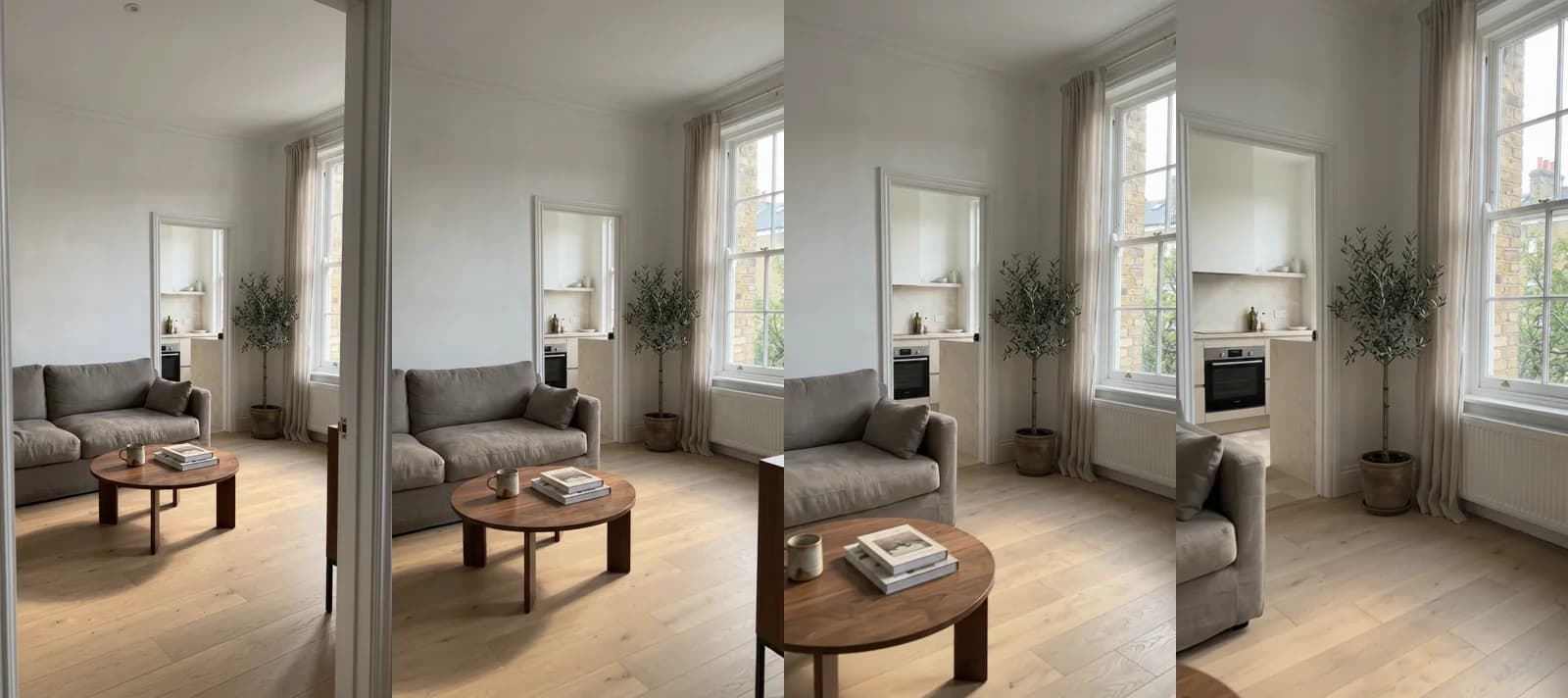 Made in Novoads with Omni Flash · six seconds at 720p in 9:16, opening on the still and walking toward the window, made through our Claude connector for the same guide, 18 credits · 2026-11-09
The still shows a sliver of brick through the window and only the front of the kitchen. As the camera moves, the model draws in houses with chimneys and a tree the still never had, a whole radiator under the sill, and the oven and more of the kitchen through the back doorway. The furniture holds its shape, though the sofa slips out of the frame before the end.
On a real unit, each of those additions is a view or a finish the renter will look for at the showing. Check every second of the clip against the unit, cut what isn't there, and if a room keeps coming back wrong, start from a photo that shows more of it. Our table prices 8-second clips, two seconds longer than this test. Each one costs 24 credits.
A talking AI actor for the special
- Open Talking Actors and write the script in the box that reads "Write what the actor will say...".
- Choose an actor with Add actors.
- Open Settings and pick 480p. It's 100 credits a started minute, half the price of the 720p default.
- Press the arrow.
You get back a take of your presenter reading the script, with voice and lip-sync. Captions are a separate step in the Captions tool, where each of its six looks costs 3 credits a started minute. Since we bill a take by the started minute, trimming a 50-second script to 40 seconds doesn't save you anything. If the special is going on TikTok, start with our TikTok ads guide.
What the special's script should say
Keep the script to the unit and the offer, both things a renter can check. We'd build it from five lines.
- the unit and where it is, by building or street
- the date it's ready and the date the special ends
- the special, in plain words
- the rent and what it includes (parking, laundry, utilities)
- how to book a showing
We'd leave out any line about who the unit suits or who'd enjoy living there. The HUD rule we cover later in this post looks at what an ad's words convey, and a line about the renter is where that can go wrong.
Listing pictures with the rent on them
- Open Image, click Reference and upload your unit photo (JPG, PNG or WebP).
- In the prompt, ask for that room with a clean band of text, and type the rent, the bed and bath count, and the move-in date exactly as they should read.
- Under Settings, pick GPT Image 2 and switch Quality from High to Medium, which takes each picture from 4 credits to 1.
- Leave Images at 3, pick a shape and send it.
That gives you three pictures for 3 credits. GPT Image 2 makes square, tall and wide pictures. For the 4:5 shape you'll need Nano Banana Pro, at 2 credits a picture. Read every word and number on each one before you post it, and check that the room still matches your photo.
The owner pitch, the review and the neighborhood ad
These reuse the same three tools.
- The owner pitch is a talking AI actor take whose script lists your services and fee word for word from your management agreement, paired with walkthrough clips of homes you manage.
- The review ad is a picture from the Image tool, made from your own photo, with the reviewer's words and star rating typed into the prompt exactly as posted.
- The neighborhood ad uses the walkthrough steps on your photos of the park or the corner café, one clip for each place.
Putting a take and its clips together into one ad is a separate step, and our cost table doesn't include it.
What one vacancy's ads cost on each plan
The set we priced covers one vacancy. That's two walkthroughs (the living room and the kitchen), a move-in special read by an AI presenter and one run of listing pictures. Prices as of November 19, 2026.
| Piece | Model and setting | Credits | Starter ($0.075 a credit) | Plus ($0.049 a credit) | Ultra 3,000 ($0.043 a credit) |
|---|---|---|---|---|---|
| Living room walkthrough | Omni Flash, 8 seconds, 720p | 24 | $1.80 | about $1.18 | about $1.03 |
| Kitchen walkthrough | Omni Flash, 8 seconds, 720p | 24 | $1.80 | about $1.18 | about $1.03 |
| Move-in special read by an AI presenter | Talking actor, 480p, up to a minute | 100 | $7.50 | $4.90 | $4.30 |
| Three listing pictures with the rent | GPT Image 2 at Medium | 3 | about 23 cents | about 15 cents | about 13 cents |
| The whole set | 151 | about $11.33 | about $7.40 | about $6.49 |
- Starter, at $15 a month for 200 credits, covers the set once with 49 credits to spare.
- Plus, at $49 a month for 1,000 credits, covers it six times.
- Ultra 3,000, at $129 a month, covers it 19 times.
You pay for every plan from the first month, and they're all on our pricing page.
What the 151 credits leave out
- Retakes, which cost the same again each time (another 24 credits for a walkthrough that comes back with a view the unit doesn't have)
- Captions, at 3 credits a started minute
- Music, and putting the pieces together into one ad
- The ad spend
- Your time checking each clip against the unit
Cheaper and pricier choices
- Wan 3.0 uses the same Start / End Frames switch and makes a walkthrough for 14 credits, at the same 8 seconds and size.
- The talking actor defaults to 720p, which costs 200 credits a started minute. Switch it to 480p in Settings if the smaller size works where you'll post it.
Compared with a videographer's rate
Fotober, a company that edits real estate photos and video, published Lucy Nguyen's pricing guide for real estate videographers on March 4, 2026. Its professional standard tier starts at $500 and includes 60-second cinematic walkthroughs and basic aerial and drone shots. That's the vendor's own figure, aimed at videographers setting their prices. And it's a different job, since a videographer shoots the unit while our set works from photos you already took. For a longer spot about your company, we priced an AI commercial separately.
HUD's rule on what a rental ad's pictures convey
None of the four guides we opened names the federal rule on what a rental ad's words and pictures convey, and that's the rule that bears on AI presenters.
What 24 CFR 100.75 says
HUD's rule on discriminatory advertisements, statements and notices is 24 CFR 100.75. Paragraph (a) makes it unlawful to make, print or publish any notice, statement or advertisement for the sale or rental of a dwelling that indicates a preference, limitation or discrimination because of race, color, religion, sex, handicap, familial status or national origin. Paragraph (c) says discriminatory ads "include, but are not limited to" the kinds it lists, and the first kind is the one that matters for pictures.
"Using words, phrases, photographs, illustrations, symbols or forms which convey that dwellings are available or not available to a particular group of persons because of race, color, religion, sex, handicap, familial status, or national origin."
Paragraph (b) adds that written notices include flyers, brochures, signs, banners, posters and billboards. We read a video ad as an advertisement under paragraph (a), like any other ad. We're quoting the annual edition of the Code of Federal Regulations dated April 1, 2025, but the rule isn't new. The part of HUD's regulations it belongs to dates from January 23, 1989.
Who has to follow it, small owners included
The rule reaches any ad to sell or rent a dwelling, anywhere in the US, whether it comes from a management company or an owner with one rental. The Fair Housing Act exempts some small owners from parts of the law, such as an owner who rents rooms or units in a building for no more than four families while living in one of them. But the exemption section, 42 U.S.C. 3603(b), opens with "Nothing in section 3604 of this title (other than subsection (c)) shall apply to", and section 3604(c) is the Act's ban on discriminatory ads. So an owner who's exempt from the rest still falls under the ad rule.
The rule names seven groups and no others. Your state or city may protect more groups under its own law, so read that law too.
Where AI presenters fit, by our reading
The rule doesn't mention AI, and it sets no casting requirement. It looks at what an ad's words and pictures convey. By our reading, that takes in the people a rental ad shows, AI presenters included, because the rule names photographs and illustrations without limiting them by how they were made, and its list isn't meant to be complete. So in the five ads above, we'd stick to these habits.
- The presenter reads the offer and the facts of the unit, and it's never shown as your leasing agent, a staff member or a tenant.
- Nothing in who the presenter is, how it looks or what it says hints at who the unit is or isn't for.
- Walkthroughs show the empty unit, with nobody in it.
- Neighborhood ads show real places nearby and no made-up residents.
- Owner pitches and review ads carry real people's own words, and no AI actor plays a landlord or a tenant.
Those habits are ours, and none of them is a requirement the rule spells out. The rule's list also covers selecting media or locations for advertising that deny particular segments of the housing market information about housing because of those seven groups. By our reading, that's where ad targeting comes in. Our real estate ads guide explains how Meta handles housing ads.
The 2024 guidance HUD withdrew
HUD withdrew its guidance of April 29, 2024, on applying the Fair Housing Act to housing ads on digital platforms, effective September 17, 2025. The withdrawal notice, published April 6, 2026, lists only guidance documents, and the rule at 24 CFR 100.75 isn't among them. The notice also says, "Any actions that do not comply with the text of the Fair Housing Act continue to be subject to enforcement by the Department." This section is our reading of HUD's own pages, and it isn't legal advice. For a specific ad, read the rule itself and ask a fair housing attorney.
Where to start on your next vacancy
Start with the walkthrough, since it uses photos you already took at the make-ready. Add the move-in special when a unit's been sitting, and the owner pitch when you're ready to add doors. You can make all of them in Novoads from your own photos and scripts with one plan's credits, then post them wherever you already advertise. If you're new to making ads this way, our guide to AI ads covers the basics.
Turn this week's unit photos into ads
Start on the photos from your last make-ready. Starter is $15 a month for 200 credits, and Plus is $49 a month for 1,000 credits.
See the plansFrequently Asked Questions
Does HUD's ad rule apply to a small landlord?
Yes, for the ads. The Fair Housing Act exempts some small owners from parts of the law. But its exemption section says nothing in section 3604 applies to them 'other than subsection (c)', and 3604(c) is the Act's ban on discriminatory ads. So a small owner's rental ad falls under the same rule as a management company's. Your state or city may add rules of its own.
Can an AI presenter read my rental ad?
HUD's ad rule doesn't mention AI, and it sets no casting requirement. It looks at what an ad's words, photographs and illustrations convey, and, by our reading, that takes in the people an ad shows, AI presenters among them. We'd have the presenter read the offer and the facts of the unit, never present it as your leasing agent or a tenant, and keep anything about who'd fit in out of the script. That's our reading of HUD's rule, and it isn't legal advice.
What does a rental video ad cost to make in Novoads?
An Omni Flash walkthrough that opens on your unit photo costs 24 credits for 8 seconds at the default size. That's $1.80 on Starter and about $1.18 on Plus. A move-in special read by a talking AI actor at 480p costs 100 credits for anything up to a minute. You pay for Novoads from your first month, and Starter is $15 a month for 200 credits. Prices as of November 19, 2026.
Is HUD's 2024 guidance on digital housing ads still in force?
No. HUD withdrew its guidance of April 29, 2024, on advertising housing through digital platforms, effective September 17, 2025. The notice that withdrew it was published on April 6, 2026, and the rule at 24 CFR 100.75 isn't among the documents it lists. The notice also says actions that don't comply with the text of the Fair Housing Act are still subject to HUD's enforcement.
Key Takeaways
- The top guides keep pointing to the vacancy walkthrough, the move-in special, the pitch to landlords, the review ad and the neighborhood ad.
- With Omni Flash set to Start / End Frames, a walkthrough in Novoads opens on your own unit photo, and an 8-second clip costs 24 credits at the default size.
- One vacancy's ad set comes to 151 credits, about $7.40 on Plus.
- HUD's rule at 24 CFR 100.75 counts an ad as discriminatory when its words, phrases, photographs or illustrations convey that a unit is or isn't available to a protected group. The ad ban also reaches owners the Fair Housing Act otherwise exempts.
- The rule doesn't mention AI and sets no casting requirement. By our reading, the people a rental ad shows, AI presenters included, are part of what the rule looks at. HUD withdrew its 2024 guidance on digital housing ads effective September 17, 2025.
Sources
- •24 CFR 100.75, Discriminatory advertisements, statements and notices (Code of Federal Regulations, edition of April 1, 2025, on govinfo)
- •24 CFR part 100, Discriminatory conduct under the Fair Housing Act, with its source note (Code of Federal Regulations, 2019 edition, on govinfo)
- •42 U.S.C. 3603, Effective dates of certain prohibitions (United States Code, 2023 Edition, on govinfo)
- •HUD, Notification of Withdrawal of Fair Housing and Equal Opportunity Guidance Documents (Federal Register, April 6, 2026, on govinfo)
- •Fotober, How Much to Charge for Real Estate Videography in 2026 (Lucy Nguyen, March 4, 2026)