Wedding Venue Ads: Ideas That Book Dates, What Each Costs With AI, and Minnesota's Rule on Mandatory Fees
Five ads that wedding venues and event spaces run, how to make each one in Novoads from your own ceremony and reception photos, what a set costs in credits on each plan, and Minnesota's rule on advertised prices that leave out a mandatory fee.

Mauricio Valdivia
·11 min
Golden hour in an empty barn, before the first tour
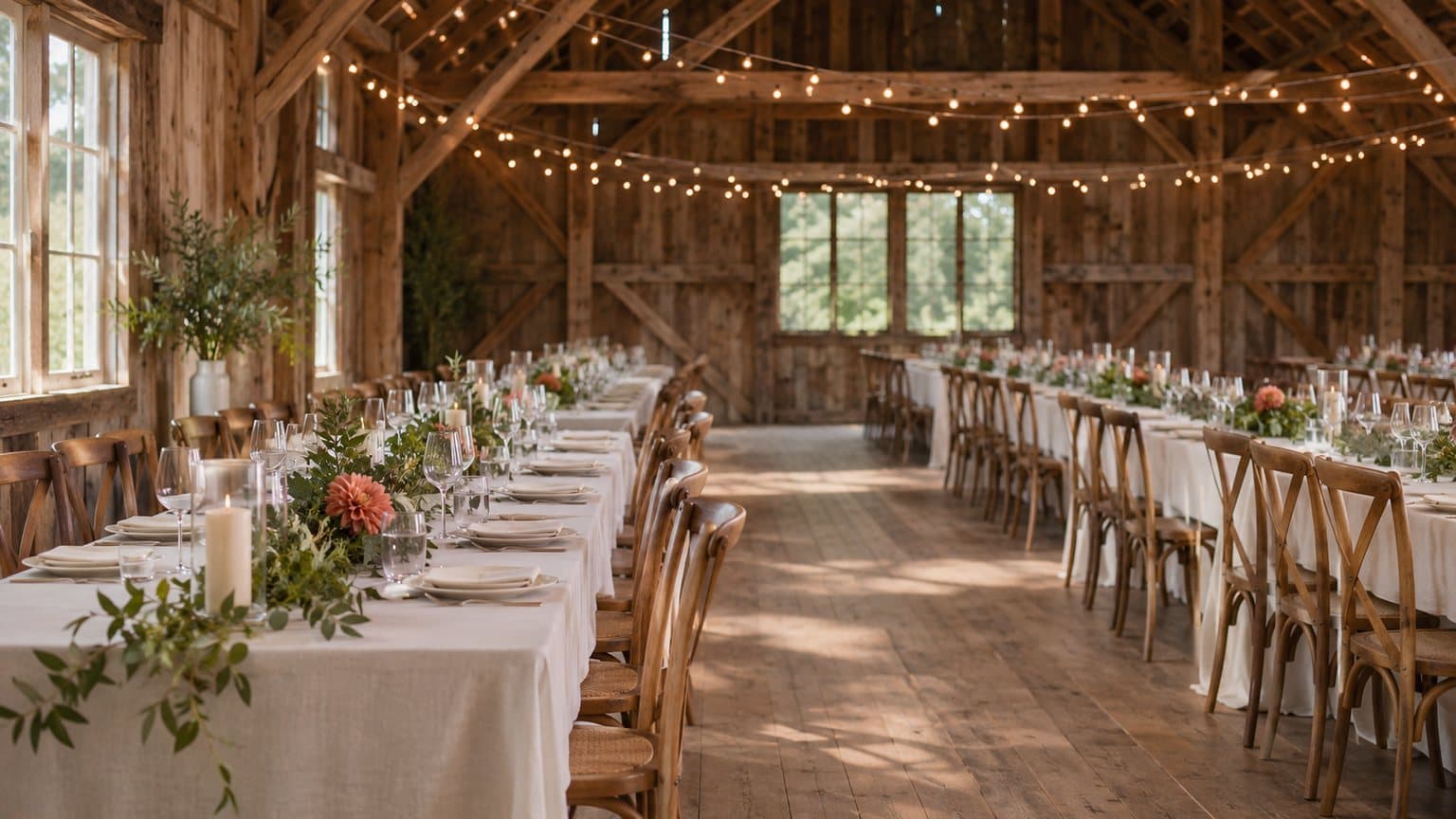
The room in our test picture has never held a wedding. It's a barn reception space, set and waiting, with wooden cross-back chairs, round tables in white linen with white flowers and small votives on each one, and string lights along the timber beams. The big doors stand open onto a lawn in low sun. We made it with GPT Image 2.6 Sunburst for 1 credit, as a stand-in for the photo you'd take of your own room the evening before a wedding. It came back with one flaw. A dark, rounded shape behind a chair at the right edge looked like it could be part of a person, so we trimmed the edges before we did anything else with it.
Then we turned the trimmed picture into a 4-second Seedance 2.0 Mini clip, for 2 credits more. The camera drifts between the tables toward the open doors while the lights glow on the beams and the sun flares in the doorway.
You've got photos like that already, probably a camera roll full of them. The hard part is turning them into ads fast enough for the dates that don't sell themselves, like Fridays and Sundays, the winter months and the opening a couple left behind when they moved their date.
For this guide, we read the top results for "wedding venue ads", Minnesota's statute on the Revisor of Statutes' site and our own credit prices on November 18, 2026. We made that still and that clip through our own connector. We haven't run these ads for a real venue, and nothing here is legal advice.
The five ads that venues keep coming back to
The guides on the first page of results come from a venue's own blog, a venue management software company, a business coaching studio, a marketing agency, a UK advice site for wedding businesses and a decor rental shop. They name the same handful of ads, but none of the six we opened puts a price on one or shows how to make one with AI.
A tour of the ceremony site, the reception room and the grounds
Most of those guides tell venues to put a tour online, so a couple can walk the space from their couch before they book a visit.
- It's for the couple who's still comparing venues and hasn't called anyone yet.
- AI does this well when it's moving your own photos, from the aisle to the reception room to the lawn at dusk.
- Leave out any room, view, season, decor or seated capacity you don't have. If a clip adds a lake, turns your November lawn into a spring garden or squeezes in extra tables, don't run it.
A couple who married with you
Real wedding stories and testimonials run through the guides too, and VintageBash, a Toronto decor and rentals business, tells venues to "share highlight reels from past weddings".
- It's the one ad nobody else can make, because those couples are yours.
- AI's part is small. It's a short clip that starts on one of the couple's own photos, used with their permission.
- It never shows an invented couple, a wedding that didn't happen at your place, a review nobody wrote or an AI actor posing as someone who booked you.
An off-peak, weekday or last-minute date
This is the ad that fills the gaps in the calendar, and three of the guides push it.
- VintageBash says to "Create special packages with lower rates for weekday or off-season weddings."
- WolfPack Advising, a marketing agency, gives it a section titled "Offer Special Weekday and Off-Season Promotions".
- GEA Systems Studio lists "Last-minute openings with special pricing" among its email ideas.
AI can make it in two ways. One is a picture ad built from your own room photo, with the dates and the price printed on it. The other is an AI presenter reading the dates and the offer. The presenter is an AI actor, and it's never you or your coordinator. And in Minnesota, the price on that ad has a rule of its own, which we'll get to below. For an open date you fill with a ticketed event of your own, turn to five ideas for event ads that sell tickets, Google's rule for ticket ads included.
The empty room, styled as an idea
GEA's guide also suggests "Before/after transformation posts", showing the empty space and then the finished event.
- AI can take your photo of the room as it stands, empty, and show one way it could be set.
- Label it as an idea, because an AI-styled room is never a wedding that was held there.
- It shouldn't show linens, florals or rentals you don't offer.
Your team setting up
VintageBash suggests posting "meet the team" clips, and GEA puts "Behind-the-scenes content: Show your team setting up" on its list. This is the one we'd film on a phone. An AI actor can't stand in for your coordinator or your bar staff, so this ad has no AI step.
Turning your ceremony and reception photos into the ads
Novoads makes the clips and the pictures, and you run them wherever you advertise. For a venue, the route you take comes down to where your real photo goes. In the Video tab, your photo becomes the clip's first frame on Kling 3.0, Kling 4.0 and Google Veo 3.1. It works that way on Omni Flash and Wan 3.0 too, once you switch from "Reference" to "Start / End Frames". Seedance takes a photo only as a reference, which you call @Image1 in the prompt, so its clip doesn't open on your room. If making ads with AI is new to you, our guide to AI ads covers the basics first.
The tour, from the ceremony space to the reception room
- Open the Video tab, which starts on Omni Flash.
- Switch from "Reference" to "Start / End Frames".
- Drop your ceremony photo where it says "Drop a start frame or click to upload", and your reception room photo in the end frame box. The editor then shows "The video starts on this picture."
- In the prompt, describe the walk you'd give a couple on a tour, such as a slow push up the aisle that turns into the reception room.
- Set 10 seconds at 720p and send it with the round arrow button.
You get back a 10-second clip that opens on your ceremony photo and ends on your reception photo, for 30 credits. Ten seconds is the longest Omni Flash goes with a start and an end frame. For the grounds, pick Wan 3.0 at the bottom of the model menu, switch it to "Start / End Frames" as well and drop in your lawn or garden photo as the start frame. Keep it at 720p. Five seconds costs 9 credits.
What our stand-in photo and clip look like
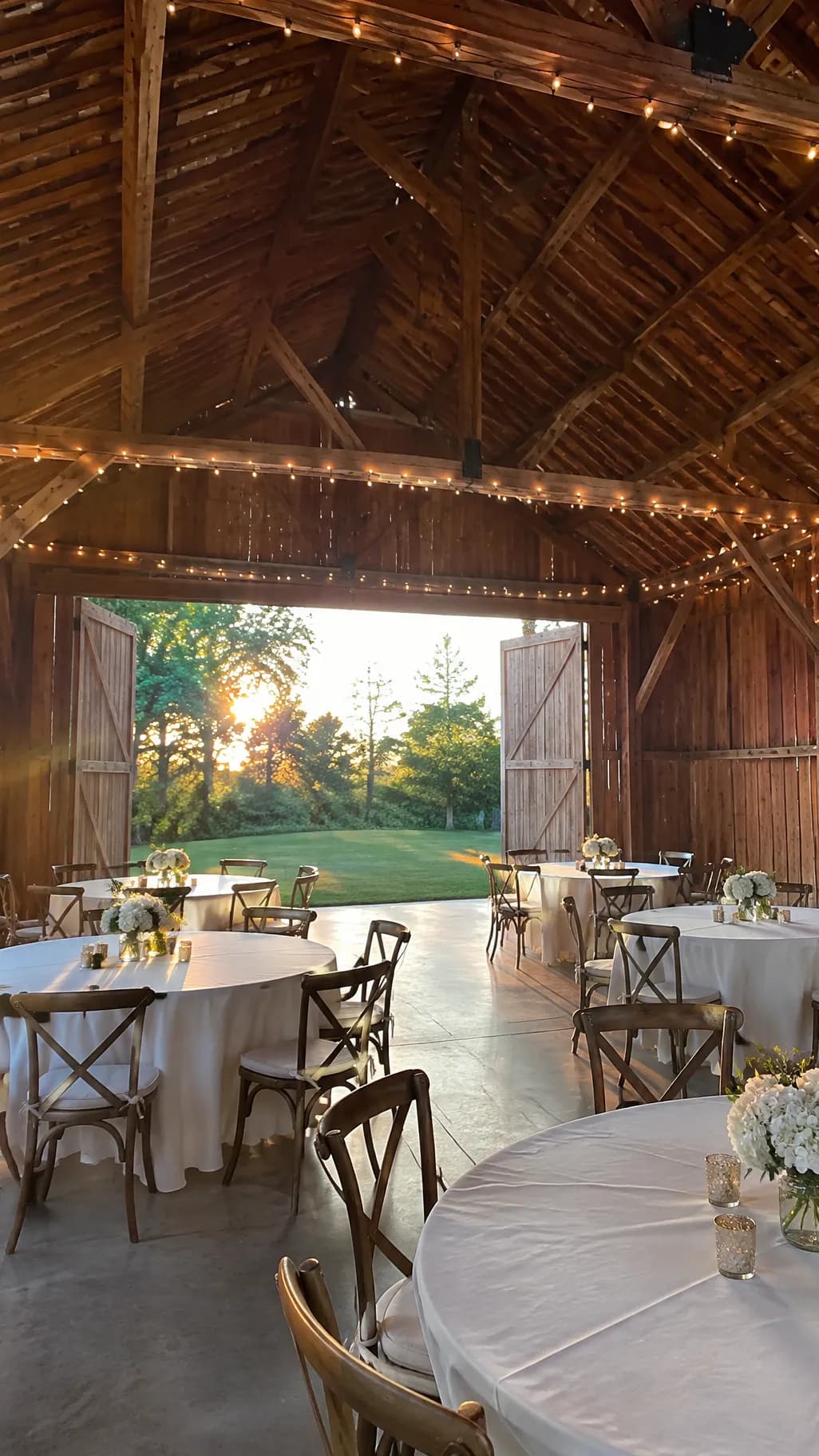 Made in Novoads with GPT Image 2.6 Sunburst · stands in for your own photo of the room · an empty barn reception space at golden hour, trimmed at the edges before its clip · 1 credit · 2026-11-18
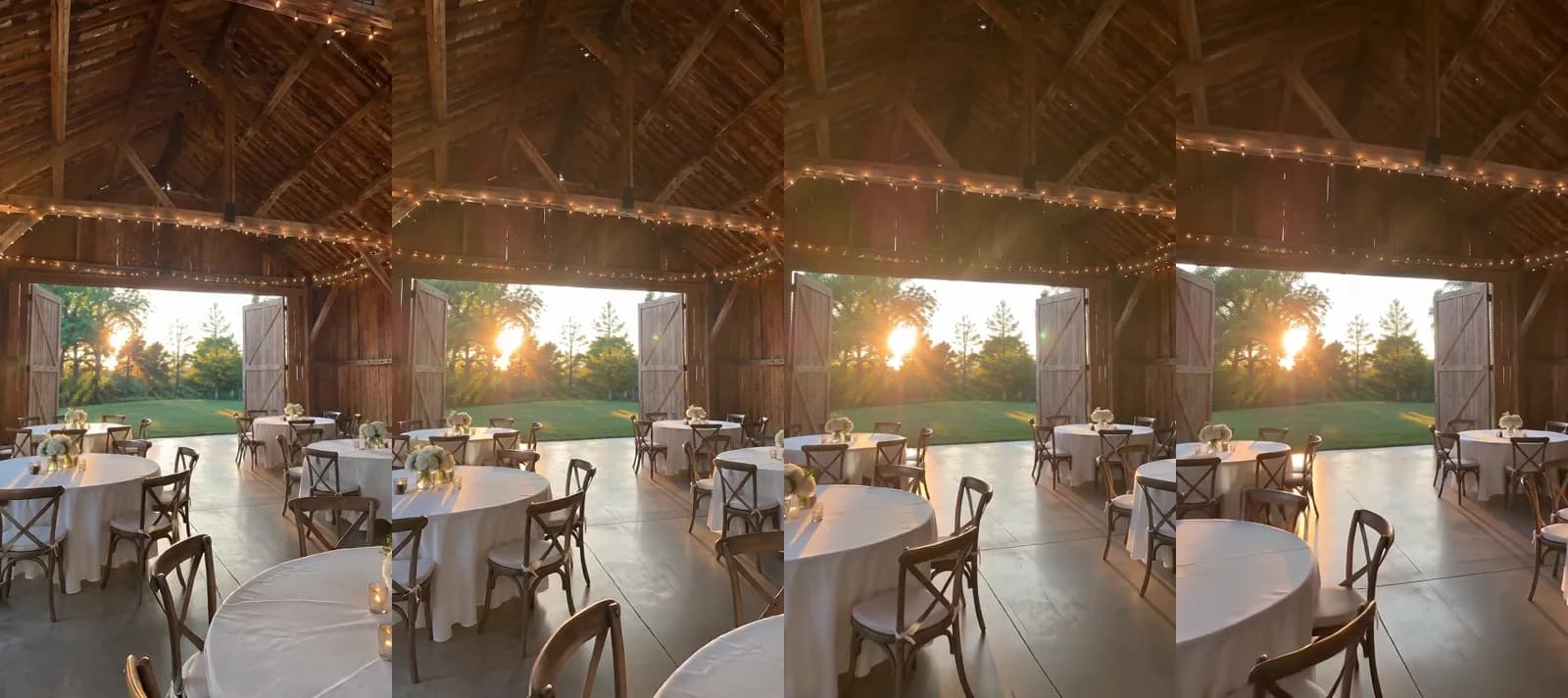 Made in Novoads with Seedance 2.0 Mini · through our connector, from the still as its start picture · a slow move between the tables toward the open doors, sound off · 4 seconds at 480p · 2 credits · 2026-11-18
Our connector can start a Seedance 2.0 Mini clip on a start picture, which is how we made that one. In the editor, you'd make the same move with Kling 3.0, or with Omni Flash or Wan 3.0 set to "Start / End Frames". We kept it small and short because it was a cheap test of the motion. An ad you're going to run is worth making at 720p. When a clip of your own room comes back, check it the way you'd walk the room before a tour. It should have the same tables, the same doors and the same view, and nobody in the frame who wasn't in your photo.
A couple's photo, with their permission
- Ask the couple first, and keep their yes in writing.
- Pick Kling 3.0 and drop in one of their photos from your venue as the start frame.
- Describe a small move, like a slow push toward the head table, and send it.
Five seconds on Kling 3.0 costs 10 credits. Keep it to their real day, with no added guests, no changed decor and no room they didn't use.
The date offer, as pictures or an AI presenter
The picture ad takes four steps.
- Open the Image tool, click Reference and upload your room photo (JPG, PNG or WebP).
- Write the ad in the prompt, with the dates and the price spelled out exactly as they should print.
- Open Settings, pick GPT Image 2 and switch Quality from High (4 credits a picture) to Medium (1 credit).
- Leave Images at its default of three pictures a run, and send it for 3 credits.
GPT Image 2 makes square, tall and wide pictures, but not 4:5. For a 4:5 feed post, switch to Nano Banana Pro, which costs 2 credits a picture. Read every date and number on each picture before it goes out, because a model can print one wrong.
The presenter takes three steps.
- Open Talking Actors, click Add actors and choose an AI actor.
- Type the script where it says "Write what the actor will say...", with the open dates, the price and what it includes.
- Send it with the round arrow button.
It comes back with voice and lip-sync at 720p unless you pick 480p. We bill it by the started minute. A minute or less costs 200 credits at the default size. At 480p, it's half that. Captions are one more step. The captions tool opens on the "TikTok, no box" look, and each of its six looks costs 3 credits a started minute. The presenter reads your offer as an AI actor, so the ad never calls it your owner, your coordinator or a couple who married with you.
The styled room and the team clip
For the styled room, follow the same Image tool steps, with your empty-room photo as the Reference and one setup in the prompt, such as a long-table dinner or a lounge corner. Put the words "styling idea" on the post or on the picture itself, so nobody takes it for a real wedding. The team clip is yours to film. Our product video guide goes further into prompting a move from a single photo, and the same habits carry over to a room.
What a set of venue ads costs on each plan
Prices as of November 18, 2026. The set is the one this guide is built around (the two tour clips, the grounds clip and one run of date pictures), all made from your own photos and with no presenter. The credits are our list prices, and the dollar figures are our own math at what you pay per credit on each plan.
| Piece | Model and setting | Credits | Starter ($0.075 a credit) | Plus ($0.049) | Ultra 3,000 ($0.043) |
|---|---|---|---|---|---|
| Tour clip, ceremony to reception | Omni Flash, 10 s, 720p | 30 | $2.25 | $1.47 | $1.29 |
| Second tour clip | Omni Flash, 10 s, 720p | 30 | $2.25 | $1.47 | $1.29 |
| The grounds | Wan 3.0, 5 s, 720p | 9 | about 68 cents | about 44 cents | about 39 cents |
| Three date pictures | GPT Image 2, Medium | 3 | about 23 cents | about 15 cents | about 13 cents |
| The whole set | 72 | $5.40 | about $3.53 | about $3.10 |
Starter's 200 credits cover two full sets a month. Plus covers 13 sets a month. The Ultra 3,000 plan covers 41.
Five things aren't in the 72 credits.
- Re-rolls, because each one costs that piece's credits again.
- An AI presenter, if you add one (200 credits at 720p).
- A voice-over and putting the clips together into one ad, since neither has a printed price we can add.
- Your ad spend on whichever platform you run it on.
- Your time checking each clip against the real rooms.
A filmed promo is the comparison most venues know. Vidico, which calls itself "a B2B explainer video company", published a promo video pricing guide on May 21, 2026. The guide asks, "How much should a 1-minute video cost?" Part of its answer reads, "Basic freelancer production can bring this down to $1,000 to $2,000." That's a vendor's figure for filming a promo, and it isn't an apples-to-apples comparison with animating photos you've already taken.
Minnesota's rule on prices that leave out a fee
None of the guides we opened says what a price in a venue's ad has to include, not even the three that tell you to advertise a lower one. Minnesota has a rule on exactly that point, and it applies only in that state.
What subdivision 1a says
Minnesota Statutes section 325D.44, subdivision 1a, reads "A person engages in a deceptive trade practice when, in the course of business, vocation, or occupation, the person advertises, displays, or offers a price for goods or services that does not include all mandatory fees or surcharges." Government taxes fall outside it, because "mandatory fee does not include taxes imposed by a government entity on the sale, use, purchase, receipt, or delivery of the goods or services." It came in with chapter 111 of Minnesota's 2024 session laws. It's been in force since January 1, 2025. We're quoting the 2026 edition on the Revisor of Statutes' site.
Who it covers, and the three exemptions
The exemptions are in subdivision 1b, headed "Exemptions", which has three clauses.
- Fees a motor vehicle dealer charges, when the law authorizes them.
- A business regulated by the Minnesota Public Utilities Commission, or its affiliate.
- The costs of real estate settlement services.
Venues aren't among them, and the statute doesn't mention venues anywhere. So by our reading, the rule covers a Minnesota venue's ad that names a rental or package price.
Two ways to comply that can fit a venue
Being covered doesn't mean every venue has to print one all-in number. Clause (g) says a person offering services "where the total cost of a service is determined by consumer selections and preferences", or by distance or time, is compliant if it discloses, clearly and conspicuously, "the factors that determine the total price", any mandatory fees and "that the total cost of the services may vary". A rental priced by guest count, date and package reads to us like that kind of service.
Clause (h) is the second route. It says "A food or beverage service establishment, including a hotel, is compliant with this subdivision" if every offer or ad that includes a price clearly and conspicuously discloses the percentage of any automatic and mandatory gratuities. The statute doesn't define that kind of establishment, so it doesn't settle whether a venue with its own catering is one.
What it means for the five ads
This part is our reading of the statute, applied to the ads above.
- The tour, the couple's highlight clip, the styled room and the team clip name no price, so the rule has nothing to say about them until you add one.
- The date offer usually names one. When a Minnesota venue's date offer shows a price, either that number includes every mandatory fee (government taxes aside) or the ad takes one of the two routes above.
- Paragraph (e) says nothing in the subdivision "prevents a person from offering goods or services at a discounted price from the advertised, displayed, or offered price", so a Friday discount can still run.
- In Novoads, that means writing the price line into the prompt exactly as you'd quote it to a couple, then checking it on every picture before it goes out.
None of this is legal advice, and the statute's own page is the place to read it in full.
Our hotel ads guide covers a different, federal rule about showing a price, and our veterinary advertising guide covers a separate Minnesota rule for clinics.
Start with the open Friday on your calendar
If one date keeps coming up empty, make that date's ad first. Take your best photo of the room when it's set for a wedding, and one of the ceremony space. Make the tour clip that moves from one to the other, then make a run of date pictures from the room photo with the real price line on them. Those are the first and last rows of the table above. Our TikTok ads guide covers where a vertical cut like that runs, and our AI commercials guide covers a longer, commercial-style cut.
We bill from the first month. Starter is $15 a month for 200 credits. Plus is $49 a month for 1,000 credits, and our pricing page lists every plan.
Turn your ceremony photo into a tour clip
Start from the photos you already have of the ceremony space and the reception room. Every plan and its monthly credits are on the pricing page.
See the plansTake those two photos the next time the room is set, and check the clip against the room before it runs anywhere.
Frequently Asked Questions
How much does a set of wedding venue ads cost to make with AI?
The set we priced comes to 72 credits, about $3.53 at the Plus rate. It's a pair of Omni Flash tour clips that move from your ceremony photo to your reception photo, a Wan 3.0 clip of the grounds and a run of GPT Image 2 date pictures. At Starter's rate, the same set costs $5.40. You pay again for every re-roll, and an AI presenter, a voice-over and putting the ad together aren't in that total.
Does a Minnesota venue's ad have to show a price?
Not as we read the statute's words. Minnesota's rule is about a price that a business advertises, displays or offers. When that price leaves out a mandatory fee or surcharge, section 325D.44 calls it a deceptive trade practice. A tour clip or a couple's highlight clip that names no price doesn't have to add one. That's our reading of the statute, and it isn't legal advice. The statute's page on the Revisor of Statutes' site has the full text.
Is a venue with its own catering a food or beverage service establishment under Minnesota's rule?
The statute doesn't say. Clause (h) lets "A food or beverage service establishment, including a hotel," comply by clearly and conspicuously disclosing the percentage of any automatic and mandatory gratuities in every ad with a price. But the subdivision never defines that term. A rental whose total changes with the guest count, the date and the package reads to us more like clause (g), which asks the ad to clearly and conspicuously disclose the factors that set the total, any mandatory fees and the fact that the total may vary. That's our reading, and it isn't a ruling.
Can an AI presenter or a past couple appear in a venue ad?
An AI presenter can read your open dates and the offer, as long as the ad never passes it off as you, your coordinator, your staff or a couple who married there. Use a real couple's photos only with their permission. And no clip or picture should show an invented couple, a wedding that didn't happen or a review nobody wrote.
Key Takeaways
- Wedding venues keep running five kinds of ads: a tour of the ceremony site and reception room, a real couple's highlight clip, an off-peak or weekday date offer, the empty room styled as an idea, and the team setting up.
- In Novoads, you can set Omni Flash to Start / End Frames and make a tour clip that opens on your own ceremony photo and ends on your own reception photo.
- The set we priced (tour clips, a grounds clip and date pictures) comes to 72 credits, about $3.53 at the Plus rate.
- In Minnesota, advertising, displaying or offering a price that leaves out a mandatory fee or surcharge is a deceptive trade practice under section 325D.44, subdivision 1a, and government taxes don't count as a mandatory fee.
- The rule has been in force since January 1, 2025, and applies only in Minnesota. By our reading, a venue can comply in two ways, by clearly and conspicuously disclosing the factors behind a total that varies or, if it's a food or beverage service establishment, the gratuity percentage.