Daycare Ads: Enrollment Video Ideas, What Each Costs With AI, and the $7,500 FSA Line for 2026
Five ads a daycare can make from photos of its own empty rooms or with an AI presenter, what each one costs in Novoads credits, and how an enrollment ad can use the 2026 dependent care figures in their 'up to' form.

Mauricio Valdivia
·12 min

Nobody has ever sat at these little tables
Four small backpacks hang in the cubbies, paper maple leaves cling to the window, and the round rug by the tables has never had a child on it. We made the room with GPT Image 2.6 Sunburst for 1 credit, as a stand-in for the photo you'd snap of your toddler room on your phone before drop-off. Then we turned it into a 5-second clip where the camera moves across the room to the cubbies.
A photo like that is the raw material for most of what a daycare advertises. You've got spots opening in the spring, a family that toured in October and never sent the enrollment packet back, and a parent on the phone asking what care will really cost once the tax help comes in. You'd rather not put the children in your care in an ad at all, and paying a videographer every time a room opens up gets expensive.
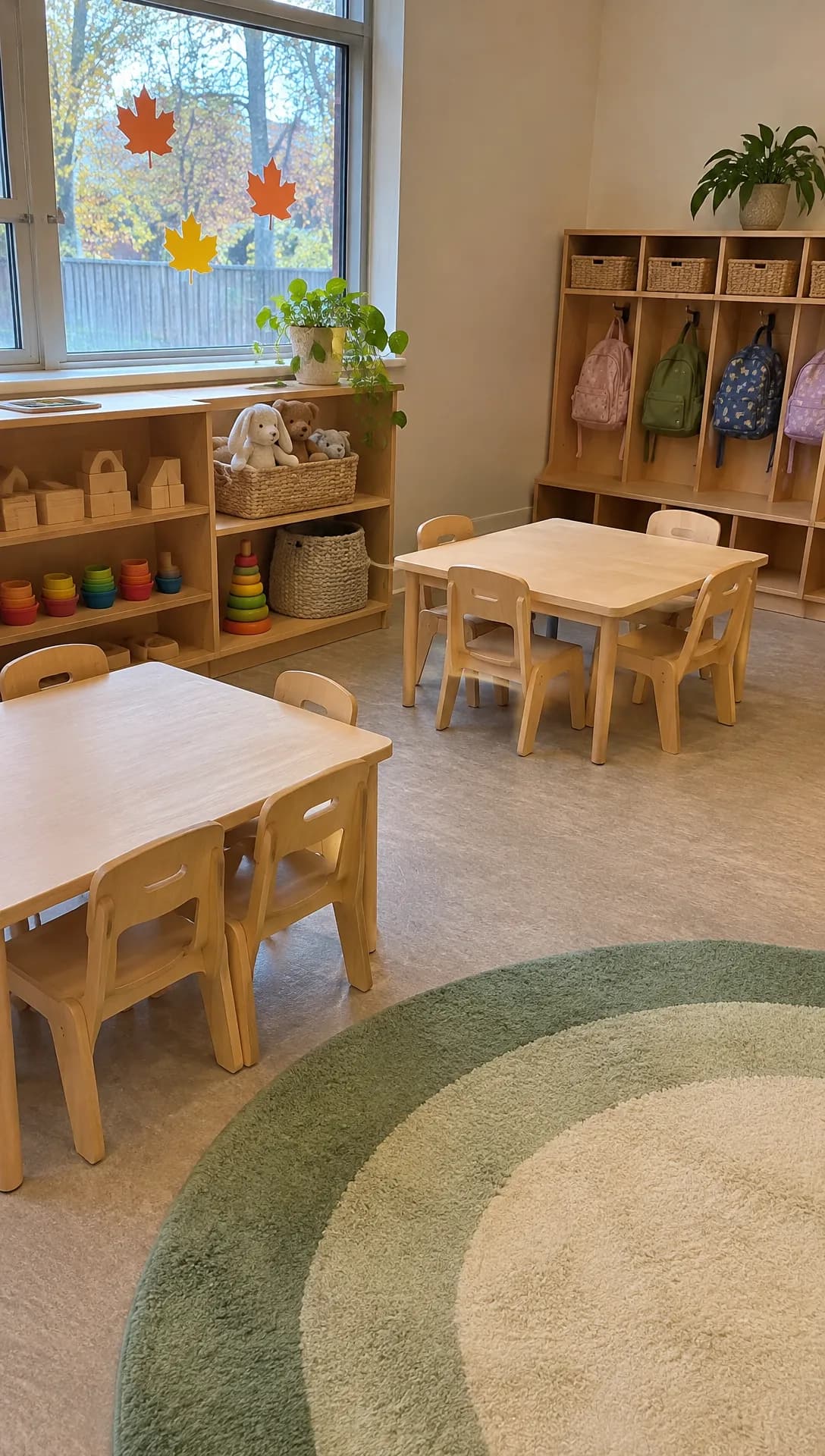 Made in Novoads with GPT Image 2.6 Sunburst · an empty daycare classroom in the morning, made to stand in for your own photo · 1 credit · 2026-11-16
On November 16, 2026, we went through Google's top results for "daycare ads", the IRS's own pages on dependent care, the enacted tax law and Florida's statute on child care advertising. Every price here comes from our credit tables, and we made the classroom and its clip for this post through our own connector. We haven't placed any of these ads for a center, so we can't tell you how many families they'd bring in.
Most of your ads can start from photos you already have, or from an AI presenter who speaks for your center. And the IRS's 2026 guide for employers has a line worth putting in front of the working parents who call you. A federal tax law raised the dependent care FSA limit for 2026 to $7,500, and an enrollment ad can use that figure as long as it keeps the "up to".
Five daycare ads, and what AI should never show in them
All five come from a list of low-budget enrollment tips posted in May 2026 by DW Bridges, which sells enrollment marketing and staffing to childcare owners. The list was the sixth result when we searched "daycare ads". What AI does well in each one, and where it has to stop, is our own reading.
An enrollment notice for the spring
This is the ad that tells families a room has spots, when they open and how to book a visit. DW Bridges suggests writing to the families who asked about care but never enrolled, with a message that reads "We have new spots opening for fall" and an offer such as a waived registration fee. A short video puts the same news in a parent's feed, and you can swap in your own season.
An AI presenter can read the notice (which room, the start date, how to book a tour), and captions put the dates on screen. It's also the ad where the 2026 FSA and credit figures fit, in their "up to" form. In Florida, your license number goes in it, as it does in any ad you run there.
Leave out any child made by AI and passed off as one of yours, any classroom that isn't yours, and any offer you don't run.
A tour of your empty rooms
DW Bridges' tip for a virtual tour lists an outside shot, the entrance, each classroom shown briefly "(no children identifiable without consent)", the playground and a short intro from the director. It's all filmed on a phone and runs 90 to 180 seconds. That's the tour for your website. The ad is a short edit of it, meant to get a parent to book the real visit.
AI's job here is to turn each room photo into a 5-second clip that opens on that photo. It's the same one-photo workflow we walk through for turning a product photo into a video. Three or four of those clips in a row make the feed version, much like the room-by-room walk in our guide to real estate ads.
The clips can't show a room, a shelf of toys or a playground the model invented, or any child made by AI, since a child in your room reads as one of yours.
The director's welcome, filmed by the director
The same tip asks for a "Brief intro from the director on camera," and we'd keep this one real. Parents are choosing the person they'll hand their child to every morning, so the director should film it on a phone, in the hallway parents will walk through.
AI's only job here is the room clips you cut in around the director. An AI presenter never plays the director or a teacher, and the welcome never claims ratios, cameras, credentials or hours the center doesn't have. Hiring teachers for spring too? Our recruitment ads post has ideas for hiring videos and the limits Meta sets on a job ad's audience.
A parent's review, word for word
DW Bridges' tip on reviews ends with "Display your best reviews on your website, social media, and tour materials." A review ad does the same thing in a feed. It takes a real parent's words, used with their permission and quoted exactly, and sets them over clips of your rooms. If you run a referral reward, it fits here too. DW Bridges suggests a tuition credit or a gift card for each family that enrolls through a referral.
An AI presenter can read the review aloud if the script introduces it as a family's words and never passes it off as the presenter's own. Never invent or trim a review, and never show a child made by AI as the reviewer's child.
Open houses and community events
An open house, a story morning or a touch-a-truck day brings families through your door, and the ad tells them what, when and where. An AI presenter can announce it, captions carry the date, and a photo of your building can open the clip. If your center shares a building with a church, we'd plan your open house alongside the church's invites and kids-and-family ads, since both court young families.
Don't let the ad show crowds of families or children made by AI as if they came to the last one, or present a fire station or a library as a partner when it hasn't agreed.
How to make each one in Novoads
You can start from photos of your own rooms or from an AI presenter who speaks for your center, and a few of these ads use both. Our step-by-step guide to making video and image ads with AI covers the basics if you haven't made one before.
Room clips from your own photos
- Take the photos before drop-off, with your phone held upright. Turn the lights on, open the blinds, and take down anything that shows or names a child, such as cubby labels, artwork with names and photo walls.
- In Novoads, open Video, press the sliders button and choose Kling 3.0 as the model. Drop your photo where it says "Drop a start frame or click to upload", and the editor shows "The video starts on this picture."
- Describe the move in plain words (a slow push toward the cubbies, with nothing else moving) and press the arrow.
- Check the clip against the real room before you use it, since a model can add a shelf, a toy or a window you don't have.
Omni Flash and Wan 3.0 also start on your photo once you switch from "Reference" to "Start / End Frames". In the editor, Seedance uses your photo as a guide you refer to as @Image1 in the prompt, so the clip doesn't start on your room.
Our clip didn't come from the editor. We made it through our own connector, which can start a Seedance 2.0 Mini clip on a picture you give it, for 5 credits. We kept the first take, a 5-second vertical clip with no sound. The camera drifts past the near table toward the cubbies, the rug drops out of the bottom of the frame, and by the last frame the far table and the row of backpacks fill the picture.
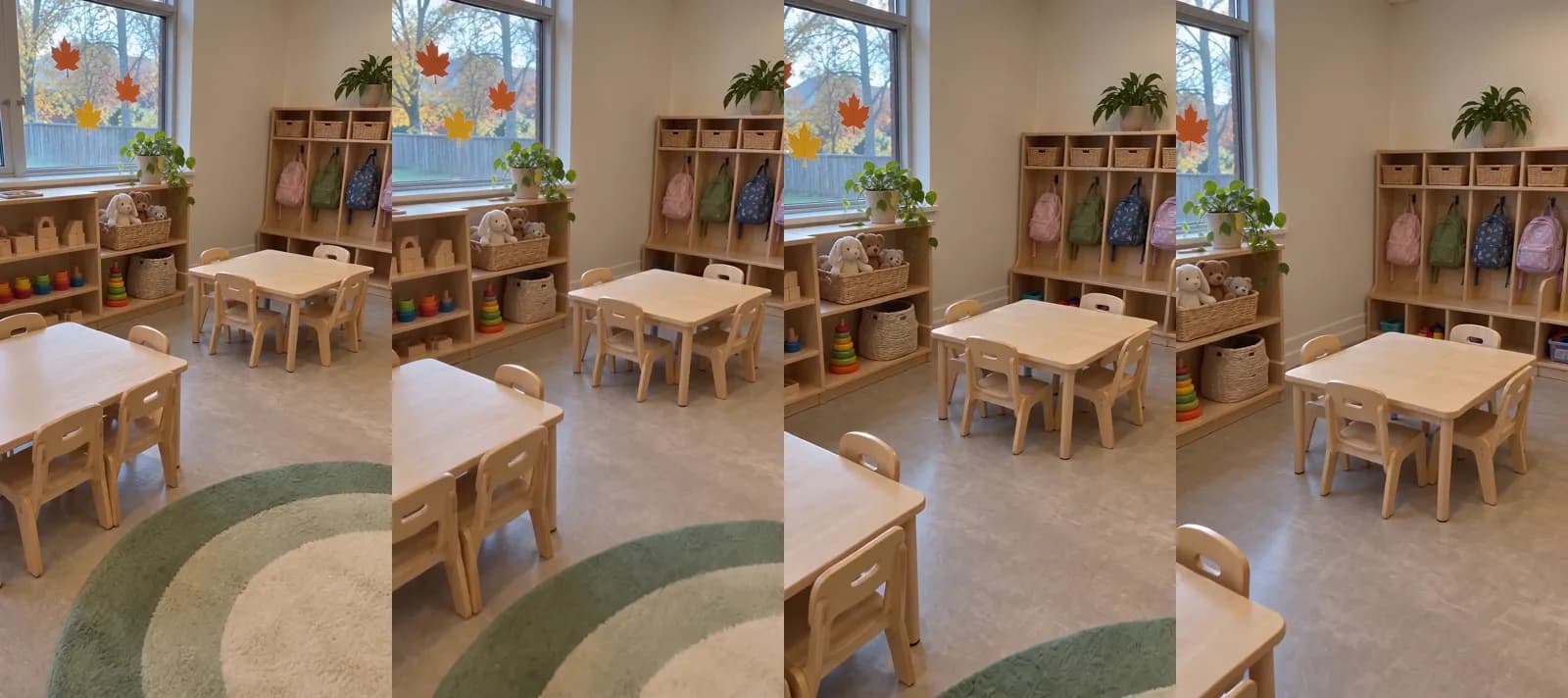 Made in Novoads with Seedance 2.0 Mini · the camera crosses the empty classroom to the cubbies, started from the still above, sound off · 5 credits · 2026-11-16
An AI presenter who speaks for the center
- Open Talking Actors and write or pick a script. Keep it under a minute and start with your center's name, so it's clear who the presenter speaks for.
- Choose an actor. The presenter speaks for your center and never plays the director, a teacher or a parent, so the script never says "I teach here" or "my daughter goes here."
- On the price line, pick 720p or 480p. The default is 720p.
- Press the arrow. You get back a video of the actor delivering your script, voiced and lip-synced.
Our voice list covers 32 languages, so the same notice can go out in Spanish for families who'd rather hear it that way. We bill every started minute, so a short notice costs as much as one that runs the full minute. Our guide to AI actors covers how brands pick a presenter.
Captions, and the license number on screen
You add captions as one more step, on the finished presenter video. In the Captions tool, you pick the video and a look, and you get back a copy with the spoken words on screen. The Karaoke look costs 0 credits in the app. On a computer, the tool opens with Casper (a paid look) selected, so pick Karaoke yourself if you want it. Room clips don't have sound, so they don't get captions.
If your center is in Florida, we'd have the presenter say the license number so it shows up in the captions, and we'd add it to the ad's own text too. We quote Florida's rule further down.
What a daycare ad costs in credits
Prices as of November 16, 2026. Every Novoads plan is billed from month one, and our pricing page lists them all. We worked out what a credit costs from each plan's monthly price.
- Starter is $15 a month for 200 credits, or 7.5 cents a credit.
- Plus is $49 a month for 1,000 credits, or 4.9 cents a credit.
- Ultra 3,000 is $129 a month for 3,000 credits, or 4.3 cents a credit.
What each piece costs
| What you make | Model and setting | Credits | Starter | Plus | Ultra 3,000 |
|---|---|---|---|---|---|
| Room clip, 5 seconds, via our connector | Seedance 2.0 Mini, 720p | 5 | about 38 cents | about 25 cents | about 22 cents |
| Room clip, 5 seconds, in the editor | Kling 3.0 | 10 | 75 cents | 49 cents | 43 cents |
| Room clip, 5 seconds, in the editor | Wan 3.0, 720p | 9 | about 68 cents | about 44 cents | about 39 cents |
| Room clip, 4 seconds, in the editor | Omni Flash, 720p | 12 | 90 cents | about 59 cents | about 52 cents |
| AI presenter, up to 60 seconds | Talking actor, 480p | 100 | $7.50 | $4.90 | $4.30 |
| AI presenter, up to 60 seconds | Talking actor, 720p | 200 | $15.00 | $9.80 | $8.60 |
Captions in the Karaoke look add 0 credits in the app. You pay for each re-roll again, at the same price. Our credit tables don't list a price for joining the presenter video to the room clips, so it isn't in any of the totals here, and neither is your ad budget.
One enrollment ad, priced on each plan
The enrollment ad we priced is an AI presenter at 480p reading a notice under a minute long. Two 5-second room clips made through our connector go with it, one of an empty classroom and one of the playground.
- 100 credits for the presenter at 480p
- 10 credits for the two room clips
- 110 credits in all
On Plus that's $5.39. The same credits cost $8.25 on Starter and $4.73 on Ultra 3,000. A Starter month covers one of these ads with 90 credits left over, and a Plus month covers nine.
Make the room clips in the editor with Kling 3.0 and the ad comes to 120 credits, or $5.88 on Plus. At 720p, the presenter alone is 200 credits, a whole Starter month. If you're weighing a longer, TV-style spot, we priced one the same way in what a 30-second AI commercial costs.
Next to a freelancer's quote
Vidico, a B2B explainer video company, published a guide to promo video costs on May 21, 2026. It puts a 1-minute promo video from a basic freelancer at $1,000 to $2,000. A freelancer films and edits that minute, so comparing it with an AI presenter and two room clips isn't like for like. We'd still make the AI version first, see which ad gets parents to book a tour, and only then pay someone to film it.
The $7,500 line and Florida's license rule, in their own words
What Publication 15-B says about the FSA limit
IRS Publication 15-B is the agency's guide for employers on fringe benefits, and its 2026 edition was last updated on April 30, 2026. It says that for the 2026 tax year, "the annual dependent care FSA limit was raised from $5,000 to $7,500". For married people filing separately, the same limit goes from $2,500 to $3,750.
The IRS is reporting a change it didn't make. A federal tax law approved on July 4, 2025, raised the limit for the 2026 tax year, in its section on the dependent care assistance program. The IRS's credit page calls that law the Working Families Tax Cuts.
Not every parent gets $7,500, though. Publication 15-B says an employee "can generally exclude from gross income up to $7,500" of these benefits a year. Its own example counts a dependent care FSA and care the employer provides on site toward one total, so the cap covers both together. And the exclusion can't be more than "the smaller of the earned income of either the employee or employee's spouse," so the lower earner in a household can bring the ceiling down.
The credit's "up to" lines
The IRS's page on the child and dependent care credit covers tax year 2026 and was last updated on October 15, 2026. Six of its lines shape what an enrollment ad can say.
- The credit is "Up to $1,500 for one qualifying person" and "Up to $3,000 for two or more qualifying persons."
- Behind those caps is a rate of "up to 50% of qualifying child and dependent care expenses." The page gives the full 50% only at an adjusted gross income of $15,000 or less. Above that, the rate falls gradually, and it "does not fall below 20%, regardless of income."
- "The actual credit amount depends on your adjusted gross income, qualifying care expenses and other tax rules," so no ad can say what a family will get back.
- A parent "cannot use the same expenses to claim both" the credit and the exclusion for employer benefits, so an ad never adds the two figures together.
- The figures are for tax year 2026 returns, "generally filed in 2027."
- Parents who claim the credit "generally must provide the name, address and taxpayer identification number of each care provider," so a center that gives families those details at the end of the year can say so in its ad.
How an enrollment ad can use them
This part is our reading, and it isn't tax advice.
- Keep the "up to". A caption such as for 2026, the federal limit on a dependent care FSA is up to $7,500 a year; ask your employer and see IRS.gov keeps the ceiling and promises no family a figure.
- Point to the source. A line that ends on IRS.gov sends a parent there to check their own case, instead of to your front desk.
- Keep the two figures apart. Never add the FSA ceiling and the credit together, never promise a tax break, and never name a savings amount.
- Say it once. One caption or one closing sentence from the presenter is enough, so the ad stays about your rooms and your openings.
Florida's license-number rule
Section 402.318 of the 2026 Florida Statutes says a person "may not advertise a child care facility, family child care home, or large family child care home without including within such advertisement the state or local agency license number or registration number of such facility or home." The same section makes a violation a misdemeanor of the first degree.
That's Florida's rule, and it covers home daycares as well as centers. We didn't read any other state's rules, so ask your licensing office whether your state has one. In Florida, we'd put the number in every video, spoken by the presenter so it shows up in the captions, and in the ad's text too.
Which daycare ad to make first
We'd start with the enrollment notice and the tour of empty rooms, since both come from the same photos and one presenter video covers the notice. If you put the tour on TikTok as well, our guide to making TikTok ads covers the formats.
- Walk your rooms before drop-off one morning this week and take one vertical photo of each, plus the playground and your front door.
- Turn the best three into 5-second room clips, and check each one against the real room.
- Write a notice under a minute long that names the room, when it opens and how to book a visit, plus the FSA line in its "up to" form if it fits.
- Make it with an AI presenter at 480p, add captions, and if you're in Florida, put your license number in it.
- Ask the director to film the welcome on a phone, and ask your happiest families for a review you can quote.
Price your spring enrollment ad before you make it
Two room clips and an AI presenter at 480p came to 110 credits when we priced them. The pricing page shows what each plan's monthly credits cover.
Compare the plansStart with the photos, on a quiet morning before the first family arrives.
Frequently Asked Questions
How do I advertise my home daycare?
Start with what you can show without the children in your care. That means a vertical photo of each room before drop-off, your outdoor space and your front door. In Novoads, each photo can become a short clip, and an AI presenter can read out your openings, your hours and how to book a visit. The presenter speaks for your home daycare and never poses as you or as a parent. If you're in Florida, the state's advertising statute names family child care homes, so every ad you run has to include your license or registration number.
Can a daycare ad mention the $7,500 dependent care FSA limit?
Yes, in its 'up to' form. IRS Publication 15-B says the 2026 limit was raised to $7,500. The change came from a federal tax law approved on July 4, 2025. The cap covers all of a parent's dependent care benefits together and can't be more than the lower earned income of the parent and their spouse, so the ad shouldn't promise any family the full amount. Point parents to IRS.gov and to their employer, and keep the limit apart from the child care credit, since the IRS says the same expenses can't count for both.
Should a daycare ad show children made with AI?
No. A child made by AI reads as a child enrolled at your center, so every ad we describe leaves children out and shows your empty rooms instead. We'd only put real children in an ad with their families' consent, which is the same line DW Bridges draws in its virtual tour tip.
What does one daycare video ad cost to make with AI?
The enrollment ad we priced is an AI presenter at 480p plus two short room clips made from photos. It comes to 110 credits, which is $5.39 on Plus at its monthly price. On Starter, the same credits cost $8.25. Re-rolls, joining the clips into one ad and your ad spend come on top. Prices are as of November 16, 2026.
Key Takeaways
- Most daycare ads are an enrollment notice, a tour of empty rooms, the director's own welcome, a parent's review or an event, and all but the welcome can start from photos you already have.
- An AI presenter speaks for the center and never plays the director, a teacher or a parent. No daycare ad should show a child made by AI.
- An enrollment ad built from an AI presenter and two short room clips came to 110 credits when we priced it, or $5.39 on Plus.
- A federal tax law raised the dependent care FSA limit to $7,500 for 2026, as IRS Publication 15-B reports. The IRS's credit page puts the credit at up to $1,500 for one qualifying person and up to $3,000 for two or more.
- An enrollment ad should keep those figures in their 'up to' form and point parents to IRS.gov. In Florida, any ad for a child care facility or home has to include its license or registration number.
Sources
- •IRS: Publication 15-B (2026), Employer's Tax Guide to Fringe Benefits
- •IRS: Child and Dependent Care Credit information
- •GovInfo: Public Law 119-21
- •The Florida Senate: 2026 Florida Statutes, section 402.318
- •DW Bridges: Childcare Marketing Tips, 12 Low-Budget Ideas to Fill Your Enrollment
- •Vidico: Promo Video Cost, What You'll Pay in 2026