Recruitment Ads: Hiring Video Ideas, What Each Costs With AI, and Meta's Employment Ad Rules
Five hiring video ideas for restaurants, clinics, trades, warehouses and stores, how to make them with AI in Novoads, what each one costs in credits, and the audience limits Meta puts on job ads.

Mauricio Valdivia
·12 min

The prep shift that's been open for three weeks
The kitchen below doesn't exist. It's a picture we generated to stand in for the photo an owner takes before service, with a steel prep line, white plates stacked on a shelf, two chef jackets on hooks and the back door open to a green courtyard. Then we turned it into a five-second clip that drifts along the line toward that door.
 Made in Novoads with GPT Image 2.6 Sunburst · a small restaurant kitchen before opening, asked for as an owner's phone photo, standing in for your own photo · 1 credit · 2026-11-16
If you hire for a place like that, you know the week this post is for. The Saturday prep shift has been open for three weeks, the line cook who booked Tuesday's interview never showed, and the holiday rush starts before you've filled the gaps you already had. Clinics short a front desk are in the same spot, and so are contractors trying to staff a second crew, warehouses adding nights and stores staffing up for December. They're all reposting the same job and hoping the right person finally sees it.
On November 16, 2026, we went through the pages ranking for "recruitment ads", Meta's developer page on special ad categories and the EEOC's page on prohibited employment practices. Every Novoads price here comes from our own credit schedule. We made the kitchen picture and its clip through our own connector, for 6 credits in all. We didn't run a job ad on Meta, and we didn't read Meta's help pages for advertisers, so nothing below describes a screen in Meta's ad tools.
Job ads on Meta follow rules of their own. Meta's developer page says a business based in the US, or one whose ads reach the US, Canada or Europe, has to declare a job ad under what Meta calls the Employment special ad category. Declaring one generally fixes the age options at 18 through 65+ and takes away gender selection and lookalike audiences. Not one of the five ranking pages we opened mentions that category. So on Meta, the targeting won't sort applicants by age or gender, and the video has to tell the right people the job is theirs by spelling out the role, the pay and the schedule.
Five hiring videos and what to leave out of each
The lists on the results page lean on campaigns with real production budgets, including a burger chain needling its rival and a music video about recruiters. Strip out the budgets and you're left with five shapes, and each one works for a kitchen, a clinic, a job site or a warehouse floor.
The plain now-hiring read
Use it when you need one shift filled this month. Someone on screen covers the role, the pay, the schedule and how to apply in the opening seconds, and nothing else gets in the way.
The presenter is where AI earns its keep. An AI presenter reads your script to camera with a voice and matching lip movement, and you can make a second version with a different opening line without booking anyone.
Stay away from any hint of who you'd rather hire. Keep words that point at an age or a sex out of the script ("young team", "students", "recent grads", "guys"), and don't give every version the same kind of presenter. The EEOC's own example of a bad help-wanted ad is about wording, and carrying it over to the faces you cast is our reading (more on both in the Meta section below). The presenter is an AI actor, so it introduces the job and never claims to work there. A line like "I love working here" turns an actor into an employee who doesn't exist.
A tour of where they'd work
Applicants want to see where they'd stand all shift, whether that's the line, the treatment room, the van, the dock or the stockroom. A tour answers that before the interview, so the person who shows up has already seen the place.
AI's job here is to turn your stills into motion. Each photo you already have of the place can become a short moving shot, so you can build a tour from your camera roll without a shoot. For a child care center hiring teachers, those clips can also serve the enrollment ads a daycare runs for parents.
Leave out anything you don't actually have. Use your own photos, and don't swap in an AI picture of a nicer kitchen, better trucks or a break room you haven't built, because the person you hire will walk into the real one. Our kitchen picture stands in for yours only because this post has no restaurant behind it.
A manager or a teammate, on their own phone
This is the ad where a real person from your team says what the job is like, and it's the one hiring ad AI can't make for you. One guide on the results page suggests having a manager talk about why they love the job.
AI handles everything around that person. Clips made from your photos can open and close the video, with the manager's own clip in the middle.
Never let an AI actor stand in for your staff. A stock presenter praising the job as if they worked there is a coworker nobody will ever meet, and whoever applies finds that out at the interview. Film the real person instead, with their OK.
A joke that only your trade gets
The jobs everyone posts (line cook, dental assistant, forklift driver, cashier) need a reason to stop the scroll. The examples on the results page lean on wordplay about the trade itself, like a job board's pun on dough as slang for money. A bakery's "We knead you" and a dental office's "Open wide, we're hiring" are examples of our own.
AI is good for trying out several jokes. An AI presenter can deliver a handful of openings for the same job, and you run the one that lands.
Keep it honest about pay, bonuses and perks, and never aim the joke at someone's age or gender.
A season piece built from your crew's clips
The music video about recruiters on the results page is the fully produced version of this one. For a restaurant, a clinic or a shop, it's a short cut of your own team at work, meant to run through the whole hiring season.
AI covers the gaps. Clips made from photos of the place before opening or after close slot in between your crew's own clips.
Nobody's face or voice goes in without their OK, and no AI-made person stands in for anyone on the crew.
Making the presenter read and the tour shots in Novoads
Most of the five ads above come down to two parts, a presenter reading your script and short clips made from your photos. You make both in Novoads, and the people who actually work for you film their own parts.
The presenter read, in Talking Actors
- Open Talking Actors and write your script, or pick one and change it to fit your job. Put the role, the pay, the schedule and how to apply in the opening lines.
- Choose an actor, and pick a different one for each version, so no single face carries the job.
- Check the price line before you send. It's set to 720p by default, and switching it to 480p halves the price per minute, which we'd do for every test version.
- Press the arrow to generate. The video comes back with the actor's voice and lip-sync.
- Add captions once the video is done. In Captions, choose that finished video and a caption style. The desktop version opens on a paid style, so switch to "Karaoke, yellow", which costs 0 credits.
Captions put the pay and the hours on screen for anyone watching with the sound off, which is why we'd never skip them on a hiring ad.
The tour, from your own photos
- Open Video and pick Kling 3.0 from the model menu.
- Drag a photo onto the upload area labeled "Drop a start frame or click to upload". The editor then shows "The video starts on this picture."
- Kling 3.0 defaults to a wide 16:9, so switch it to 9:16 for a phone. Leave the length at the default five seconds.
- Write the camera move the way you'd say it out loud, for example "the camera moves slowly along the prep line toward the open back door, no people", and send it with the round up-arrow button.
- Repeat with each photo (the walk-in, the pass, the dish pit) until the tour has a few short shots.
Omni Flash and Wan 3.0 can also start on your photo once you switch from "Reference" to "Start / End Frames". In the editor, the Seedance models treat a photo as a reference that your prompt points to as @Image1, and the clip doesn't start on it.
We made our own clip a different way, through our connector, where a Seedance 2.0 Mini clip can start on a picture. We sent the kitchen picture and asked for a slow move along the prep line toward the back door, with the sound off. We kept the first take, and these are four frames from it.
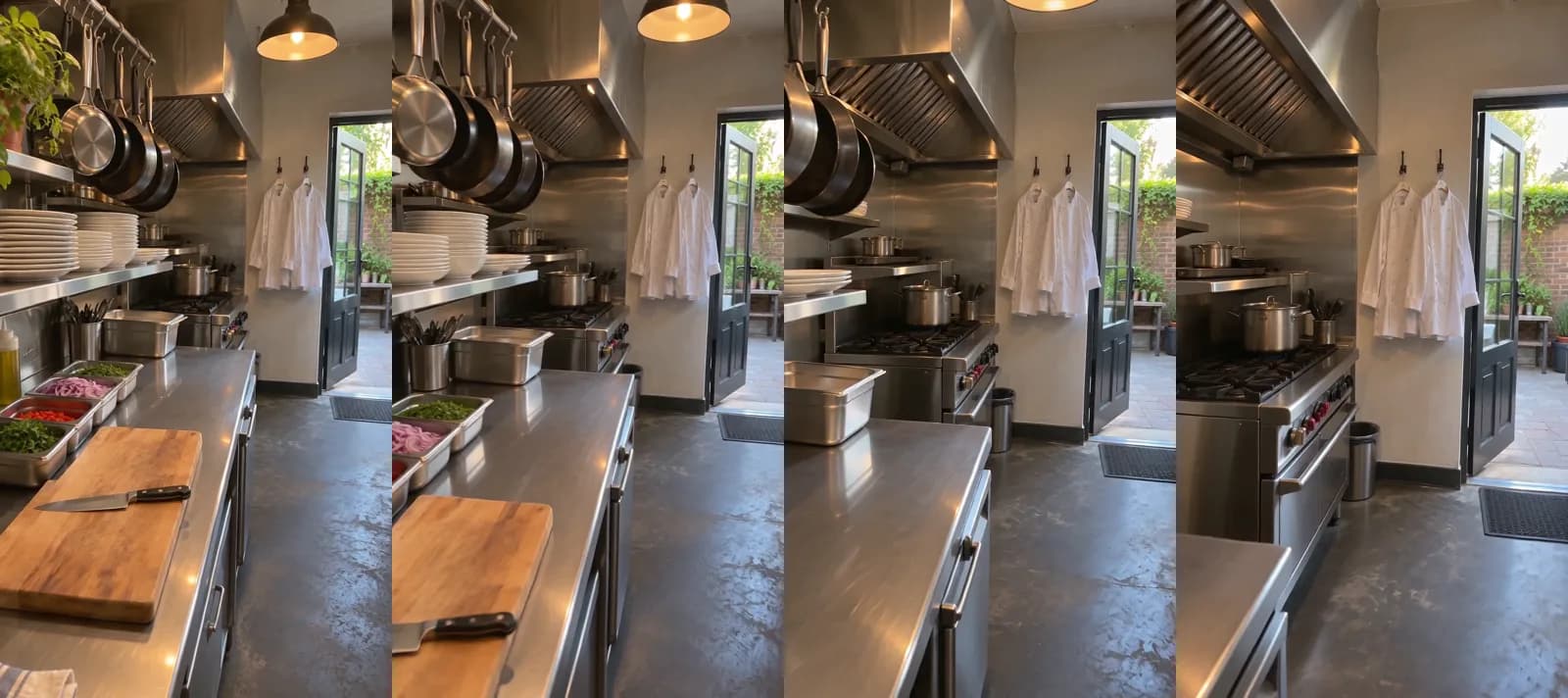 Made in Novoads with Seedance 2.0 Mini · the kitchen picture as the start picture, sent through our connector, a camera move along the prep line toward the back door, sound off, 5 seconds at 720p · 5 credits · 2026-11-16
The cutting board slides out of the frame, a range comes into view, and the chef jackets stay on their hooks the whole way. It runs five seconds at 720p with no sound, which suits a tour shot that'll play under the presenter's voice.
The manager's clip and the season piece
For the two ads with real people in them, the person films on their own phone, and you make the shots around them with the tour steps above. Joining it all into one finished ad is the last step, and it's charged on top of the prices below.
New to AI ads altogether? Our walk-through of video and image ads made with AI covers the basics we skip. The photo steps carry over to products too, as our guide to a finished ad from a single product photo shows.
What a hiring video costs, from one clip to a month of ads
Every Novoads plan is paid from day one and comes with a fixed number of credits a month.
- Starter is $15 a month for 200 credits.
- Plus is $49 a month for 1,000 credits.
- Ultra 3,000 is $129 a month.
Prices as of November 16, 2026. We worked out each dollar figure from what one credit costs on that plan, rounded to the cent.
| What you make | Credits | Starter (7.5 cents a credit) | Plus (4.9 cents a credit) | Ultra 3,000 (4.3 cents a credit) |
|---|---|---|---|---|
| Presenter read, up to 60 seconds at 480p | 100 | $7.50 | $4.90 | $4.30 |
| Presenter read, up to 60 seconds at 720p | 200 | $15.00 | $9.80 | $8.60 |
| Kling 3.0 clip from your photo, 5 seconds | 10 | 75 cents | 49 cents | 43 cents |
| Wan 3.0 clip from your photo, 5 seconds at 720p | 9 | 68 cents | 44 cents | 39 cents |
| Omni Flash clip from your photo, 4 seconds at 720p | 12 | 90 cents | 59 cents | 52 cents |
| Seedance 2.0 Mini clip from a picture through our connector, 5 seconds at 720p | 5 | 38 cents | 25 cents | 22 cents |
| A now-hiring ad, a 480p presenter read plus two Kling 3.0 clips | 120 | $9.00 | $5.88 | $5.16 |
Each started minute of a presenter read counts as a full minute, so even a quick read is billed for one. Fit the whole offer into one take. How many times the bottom row (one now-hiring read plus a pair of tour shots) fits into a month depends on the plan.
- Once on Starter, with 80 credits left over.
- Eight times on Plus, with 40 left over.
- Exactly 25 times on Ultra 3,000.
Two costs aren't in the table. Joining the read and the tour shots into a finished ad is charged on top of these numbers, and so is the budget you set on Meta to show it. This ad doesn't need a separate voice-over, since the presenter read has its own voice. You can compare the plans side by side on our pricing page.
Motion The Agency, a London studio that makes animated video for B2B and tech companies, puts a price on the other route. On its employer branding page, the answer to what a recruitment video costs opens with "Our fixed price starts at $3,480 for an animated video", and it names length, complexity and the number of versions as the main variables. We read that on November 16, 2026. We'd take it as the price of handing the whole job to a studio. That's a different purchase from the parts in our table, which you put together yourself. If you want something closer to a full commercial, our look at AI commercials and what one costs goes further.
Meta's Employment category and what it does to your audience
Meta's developer page on special ad categories, which documents its Marketing API, sets out who has to declare a job ad and what declaring it changes. The page isn't dated, and we read it on November 16, 2026. Three groups of advertisers have to identify or declare an employment campaign, each starting on its own date.
- Businesses located in the US or reaching users in the US, since December 4, 2019. Meta's page says that otherwise "their ads are not allowed to run."
- Advertisers whose job ads reach Canada, starting December 3, 2020.
- Advertisers whose job ads reach Europe, starting December 7, 2021.
The same page says the US requirement "applies across all ad buying surfaces, including the Marketing API." It then lists what the category takes away for advertisers based in the US, or running ads that reach the US, Canada or Europe. Three of those limits decide who sees a job ad.
- The age options "are generally fixed to include ages 18 through 65+" for employment ads, and the only exception the page names is credit ads in Europe.
- "Specific gender cannot be chosen." Elsewhere the page adds "Your audience must include all genders."
- "Lookalike audiences are unavailable" for employment ads, and for housing and financial ones too.
According to the same page, every campaign created through Meta's API has to include the category field. That doesn't mean every campaign picks a category, since one that needs none can pass NONE or an empty array. And a business outside the US whose ads reach none of the US, Canada or Europe may opt out by entering NONE there, even for a job ad. Housing ads fall under a sibling category with its own audience table, which our real estate ads guide covers.
The second page is the EEOC's, which we read the same day. On its page about practices that are illegal under the laws it enforces, the EEOC says "It is illegal for an employer to publish a job advertisement that shows a preference for or discourages someone from applying for a job because of his or her race, color, religion, sex (including transgender status, sexual orientation, and pregnancy), national origin, age (40 or older), disability or genetic information." Its example hits close to home for anyone hiring entry-level staff. It says "a help-wanted ad that seeks 'females' or 'recent college graduates' may discourage men and people over 40 from applying and may violate the law."
The EEOC's line is about what an employer's job ad says, and its page is where to read the rule in full. None of this is legal advice. Neither page mentions AI presenters, so these are our own readings of how the two pages apply to the five ads above.
- On Meta, the targeting won't sort applicants by age or gender, so say who the job is for through the role, the pay and the schedule. A first line like "Line cook, weekend nights, pay on screen" does the sorting that age and gender settings can't.
- Applying the EEOC's line to the faces you cast is our reading. We'd rotate presenters across versions and never cast in a way that makes the ad read as wanting one age or one sex.
- An AI presenter introduces the job. It never plays your manager, your crew or anyone who works there.
Start with the job you've reposted the most
Write the role, the pay, the schedule and how to apply into the opening lines. Make one 480p presenter read and a pair of tour shots from photos of your place, and run that before you spend on anything bigger. If you're a store hiring for the holidays, you're selling hard that month too, and the selling side is in our roundup of ecommerce video ads. A hotel hiring for its busy season needs guests in those weeks, and we cover hotel video ads from photos of your rooms separately. The same vertical clips can run on TikTok as well, and our guide to TikTok ads walks through making ads there. Your next prep cook should walk in on their first morning and find the same kitchen they saw in the ad.
Make this month's hiring ad
A presenter read at 480p and two tour shots from your own photos come to 120 credits. Every plan and its credits are on one page.
Compare the plansFrequently Asked Questions
What is a hiring campaign?
It's a planned run of job ads meant to fill specific roles by a set date, like a restaurant staffing up before the holidays or a warehouse adding a night shift. It usually pairs a few versions of the ad with one clear way to apply, and it stops once the roles are filled. If it runs on Meta and your business is based in the US, or your ads reach the US, Canada or Europe, Meta's developer page says you have to declare each job ad under the Employment special ad category.
Can I target a Facebook job ad by age or gender?
Not once the Employment category applies to you. Meta's developer page says a job ad from a business based in the US, or one whose ads reach the US, Canada or Europe, has to be declared in that category. The age options are then generally fixed to include ages 18 through 65+, custom gender selection is unavailable and you can't use lookalike audiences. So the video has to say who the job is for, through the role, the pay and the schedule.
How much does it cost to make a hiring video with AI?
In Novoads, a presenter read at 480p plus a pair of short Kling 3.0 clips from your photos is 120 credits. At November 2026 prices, that's $5.88 on Plus. On Starter, the same ad is $9.00. Captions in the Karaoke look add 0 credits, and joining the pieces into a finished ad is charged on top of that.
Can an AI presenter say they work at my business?
We'd never write it that way. An AI presenter is an AI actor, so the script introduces the job ("We're hiring prep cooks for weekend mornings") and never claims to have worked there ("I've worked here for years"). If you want a real employee on camera, they film themselves on their own phone, with their OK, and AI makes the shots around them.
Key Takeaways
- Meta's developer page says a business based in the US, or one whose ads reach the US, Canada or Europe, has to declare a job ad under the Employment special ad category.
- Declaring a job ad that way generally fixes the age options at 18 through 65+, takes away custom gender selection and rules out lookalike audiences. So the video itself has to say who the job is for, through the role, the pay and the schedule.
- The EEOC says it's illegal for an employer to publish a job ad that shows a preference based on traits that include sex and age (40 or older). Extending that to the AI presenters you cast is our own reading.
- In Novoads, a presenter read at 480p plus a pair of Kling 3.0 clips from your photos is 120 credits. That's $5.88 on Plus as of November 2026.
- An AI presenter is an AI actor, so it introduces the job and never plays your manager or your crew. The people who actually work for you film their own parts, with their OK.